배열 객체나 java.util.List 타입의 컬렉션 객체는 <list> 태그를 사용하여 설정합니다. 먼저 List 컬렉션을 맴버변수로 가지는 CollectionBean 클래스를 다음과 같이 작성합니다.
package com.springbook.ioc.injection;

import java.util.List;

public class CollectionBean {
	private List<String> addressList;

	public void setAddressList(List<String> addressList) {
		this.addressList = addressList;
	}
	public List<String> getAddressList(){
		return addressList;
	}
}
작성된 CollectionBean 클래스를 스프링 설정 파일에 다음과 같이 bean 등록합니다.
<?xml version="1.0" encoding="UTF-8"?>
<beans xmlns="http://www.springframework.org/schema/beans"
	xmlns:xsi="http://www.w3.org/2001/XMLSchema-instance"
	xmlns:p="http://www.springframework.org/schema/p"
	xmlns:util="http://www.springframework.org/schema/util"
	xsi:schemaLocation="http://www.springframework.org/schema/beans http://www.springframework.org/schema/beans/spring-beans.xsd
		http://www.springframework.org/schema/util http://www.springframework.org/schema/util/spring-util-4.3.xsd">

	<bean id ="collectionBean"
		class="com.springbook.ioc.injection.CollectionBean">
		<property name="addressList">
			<list>
				<value>서울시 강남구 역삼동</value>
				<value>서울시 성동구 행남동</value>
			</list>
			 <!-- 이 설정은 두 개의 문자열 주소가 저장된 List 객체를 CollectionBean
     				객체의 setAddressList() 메서드를 호출할때  인자로 전달하여
    				addressList맴버 번수를 초기화하는 설정입니다.-->
		</property>
	</bean>
</beans>
이제 간단한 클라이언트 프로그램을 작성하여 List컬렉션이 정상적으로 의존성 주입되었는지 확인해봅니다.
package com.springbook.ioc.injection;

import java.util.List;

import org.springframework.context.support.AbstractApplicationContext;
import org.springframework.context.support.GenericXmlApplicationContext;

public class CollectionBeanClient {

	public static void main(String[] args) {
        // 1.스프링 컨테이너를 구동합니다.
		AbstractApplicationContext factory =
					new GenericXmlApplicationContext("applicationContext2.xml");
        // GenericXmlApplicationContext = 파일 시스템이나
        //  클래스 경로에 있는 xml 설정 파일을 로딩하여 구동하는 컨테이너 입니다.

		// 환경 설정 파일인 applicationContext2 파일을 로딩하여 스프링 컨테이너 중 하나인
		// GenericXmlApplicationContext를 구동합니다.

		CollectionBean bean = (CollectionBean) factory.getBean("collectionBean");
		List<String> addressList = bean.getAddressList();
		for(String address : addressList) {
			System.out.println(address.toString());
		}
		factory.close();
	}
}
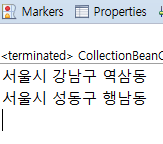
Set매핑타입
중복 값을 허용하지 않는 집합 객체를 사용할 때는 java.util.Set이라는 컬렉션을 사용합니다. 컬렉션 객체는<set>태그를 사용하여 설정할 수 있씁니다.
package com.springbook.ioc.injection;

import java.util.List;
import java.util.Set;

public class CollectionBean {
	// private List<String> addressList;
	private Set<String> addressList;

	//public void setAddressList(List<String> addressList)
	public void setAddressList(Set<String> addressList) {
		this.addressList = addressList;
	}
	//public List<String> getAddressList()
	public Set<String> getAddressList(){
		return addressList;
	}
}
<?xml version="1.0" encoding="UTF-8"?>
<beans xmlns="http://www.springframework.org/schema/beans"
	xmlns:xsi="http://www.w3.org/2001/XMLSchema-instance"
	xmlns:p="http://www.springframework.org/schema/p"
	xmlns:util="http://www.springframework.org/schema/util"
	xsi:schemaLocation="http://www.springframework.org/schema/beans http://www.springframework.org/schema/beans/spring-beans.xsd
		http://www.springframework.org/schema/util http://www.springframework.org/schema/util/spring-util-4.3.xsd">

	<bean id ="collectionBean"
		class="com.springbook.ioc.injection.CollectionBean">
		<property name="addressList">
			<set value-type="java.long.String">
			<value>서울시 강남구 역삼동</value>
			<value>서울시 성동구 성수동</value>
			<value>서울시 성동구 성수동</value>
			</set>
		</property>
	</bean>
</beans>
위의 예는 setAddressList() 메서드를 호출할 때, 문자열 타입의 데이터 여러 개를 저장한 Set 컬렉션을 인자로 전달하겠다는 설정입니다.
위에 중복값이 2개 있는데 Set컬렉션은 "서울시 성동구 성수동"이라는 주소는 하나만 저장됩니다.
Map 타입 매핑
특정 key로 데이터를 등록하고 사용할 때는 java.util.Map 컬렉션을 사용하며, <map>태그를 사용하여 설정할 수 있습니다.
package com.springbook.ioc.injection;

import java.util.Map;
import java.util.Set;

public class CollectionBean {
	// private List<String> addressList;
	// private Set<String> addressList;
	private Map<String, String> addressList;

	//public void setAddressList(List<String> addressList)
	//public void setAddressList(Set<String> addressList)
	public void setAddressList(Map<String, String> addressList) {
		this.addressList = addressList;
	}
	//public List<String> getAddressList()
	//public Set<String> getAddressList()
	public Map<String, String> getAddressList(){
		return addressList;
	}
}
applicationContext 변경
<?xml version="1.0" encoding="UTF-8"?>
<beans xmlns="http://www.springframework.org/schema/beans"
	xmlns:xsi="http://www.w3.org/2001/XMLSchema-instance"
	xmlns:p="http://www.springframework.org/schema/p"
	xmlns:util="http://www.springframework.org/schema/util"
	xsi:schemaLocation="http://www.springframework.org/schema/beans http://www.springframework.org/schema/beans/spring-beans.xsd
		http://www.springframework.org/schema/util http://www.springframework.org/schema/util/spring-util-4.3.xsd">

	<bean id ="collectionBean"
		class="com.springbook.ioc.injection.CollectionBean">
		<property name="addressList">
			<map>
				<entry>
				<key><value>고길동</value></key>
				<value>서울시 강남구 역삼동</value>
				</entry>
				<entry>
				<key><value>마이콜</value></key>
				<value>서울시 강서구 화곡동</value>
				</entry>
			</map>
		</property>
	</bean>
</beans>
이 예제는 setAddressList() 메서드가 호출될 때, Map타입의 객체를 인자로 전달하는 설정입니다.
이때 <entry>엘리먼트에서 사용된 <key> 엘리먼트는 Map 객체의 key 값을 설정할 때 사용하며,<value>엘리먼트는 Map 객체의 value를 설정할 때 사용됩니다.
그로기 CollectionBean 클래스와 applicationContext.xml 파일을 수정했다면 당연히 클라이언트에 해당하는
CollectionBeanClient.java파일의 getAddressList() 메서드를 호출하는 부분도 적절히 수정해야 합니다.
책은
Map<String, String> addressList = bean.getAddressList();이렇게만 바꾸라고 나와있는데 원래코드에 바꿔서 실행시켜도 실행이 안됩니다.
package com.springbook.ioc.injection;

import java.util.Iterator;
import java.util.Map;

import org.springframework.context.support.AbstractApplicationContext;
import org.springframework.context.support.GenericXmlApplicationContext;

public class CollectionBeanClient {

	public static void main(String[] args) {
		AbstractApplicationContext factory =
					new GenericXmlApplicationContext("applicationContext2.xml");

		CollectionBean bean = (CollectionBean) factory.getBean("collectionBean");

		Map<String, String> addressList = bean.getAddressList();

		// 방법 1
		/*for(Map.Entry<String, String> entry: addressList.entrySet()) {
			System.out.println("[key]"+entry.getKey() + ",[value]" + entry.getValue());
		}*/
		System.out.println("===============================");
		// 방법 2
		for(String key : addressList.keySet()) {
			String value = addressList.get(key);
			System.out.println("[key]"+key+",[value]"+value);
		}

		System.out.println("===============================");

		// 방법 3
		Iterator<Map.Entry<String, String>> iteratorE = addressList.entrySet().iterator();
		while(iteratorE.hasNext()) {
			Map.Entry<String, String> entry = (Map.Entry<String, String>) iteratorE.next();
			String key = entry.getKey();
			String value = entry.getValue();
			System.out.println("[key]"+key+",[value]"+value);
		}

		System.out.println("===============================");

		// 방법 4
		Iterator<String> iteratorK = addressList.keySet().iterator();
		while(iteratorK.hasNext()) {
			String key = iteratorK.next();
			String value = addressList.get(key);
			System.out.println("[key]"+key+",[value]"+value);
		}
		factory.close();
	}
}
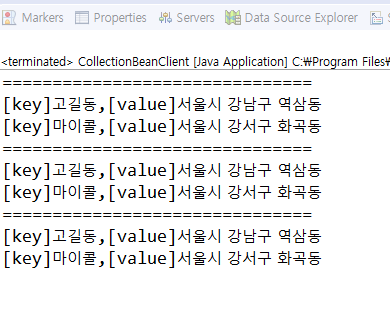
Map 에 값을 전체 출력하기 위해서는 entrySet(), ketSet() 메서드를 사용해야하는데 entrySet() 메서드는 key와 value의 값이 모두 필요한 경우에 사용하고, keySet()메서드는 key의 값만 필요한 경우에 사용합니다.
iterator 인터페이스를 사용할 수 없는 컬렉션인 Map 에서 iterator 인터페이스를 사용하기 위해서는 Map 에 entrySet().ketSet() 메서드를 사용하여 Set객체를 받환받은 후에 iterator 인터페이스를 사용하면 됩니다.
Properties 타입 매핑
Key = Value 형태의 데이터를 등록하고 사용할떄는 java.util.Properties 라는 컬렉션을 사용하며, <props> 엘리먼트를 사용하여 설정합니다.
package com.springbook.ioc.injection;

import java.util.Map;
import java.util.Properties;

public class CollectionBean {
	// private List<String> addressList;
	// private Set<String> addressList;
	// private Map<String, String> addressList;
	private Properties addressList;

	// public void setAddressList(List<String> addressList)
	// public void setAddressList(Set<String> addressList)
	// public void setAddressList(Map<String, String> addressList)
	public void setAddressList(Properties addressList) {
		this.addressList = addressList;
	}
	// public List<String> getAddressList()
	// public Set<String> getAddressList()
	public Properties getAddressList(){
		return addressList;
	}
}
<?xml version="1.0" encoding="UTF-8"?>
<beans xmlns="http://www.springframework.org/schema/beans"
	xmlns:xsi="http://www.w3.org/2001/XMLSchema-instance"
	xmlns:p="http://www.springframework.org/schema/p"
	xmlns:util="http://www.springframework.org/schema/util"
	xsi:schemaLocation="http://www.springframework.org/schema/beans http://www.springframework.org/schema/beans/spring-beans.xsd
		http://www.springframework.org/schema/util http://www.springframework.org/schema/util/spring-util-4.3.xsd">

	<bean id ="collectionBean"
		class="com.springbook.ioc.injection.CollectionBean">
		<property name="addressList">
			<props>
				<prop key="고길동">서울시 강남구 역삼동</prop>
				<prop key="마이콜">서울시 강서구 화곡동</prop>
			</props>
		</property>
	</bean>
</beans>
위으ㅔ 예는 setAddressList() 메서드를 호출할 때, java.util.Properties 타입의 객체를 인자로 전달하는 설정입니다.
CollectionBeanClient.java 파일의 getAddressList() 메서드를 호출하는 부분도 적절히 수정해야합니다.
Properties는 HashTable을 상속받아 구현한 컬렉션의 한종류입니다.
HashMap은 키와 값(Object, Object) 형태로 저장하는데 Properties는 오브젝트가 아닌 String형태로
저장하는 보다 간단한 컬렉션 클래스 입니다.
'Spring' 카테고리의 다른 글
| MyBatis (0) | 2022.08.12 |
|---|---|
| 어노테이션 기반 설정 (0) | 2022.08.05 |
| AOP 01 (0) | 2022.07.29 |
| log4j2 (0) | 2022.07.27 |
| 제어의 역행(역전) : IoC(DI) (0) | 2022.07.25 |

